

Introduction
If you play mobile, PC, or online games, you may have heard of Razer Gold. It is a digital payment service made for gamers. You can add money to your Razer Gold wallet and use it to buy games, game credits, virtual items, and other digital entertainment from supported partners.
Razer describes Gold as unified virtual credits for gamers. Its official services page says Razer Gold can be used across more than 42,000 games and entertainment titles, although the exact catalog depends on your region.
“If you enjoy story-focused games, you can also explore our guide to the Best Story Games of All Time.”
The service is useful because you do not always need to enter your payment information separately on every supported game or store. However, Razer Gold is not the same as a normal bank account, and its balance has specific rules. This guide explains how it works, how to add money, where you can use it, what Razer Silver means, and what to check before making a purchase.
Table of Contents
- What Is Razer Gold and How Does It Work?
- How to Buy, Add, and Use Razer Gold
- Where Can You Use Razer Gold?
- Razer Gold Benefits, Drawbacks, and Safety Tips
- Is Razer Gold Worth Using?
- Frequently Asked Questions
- Conclusion
What Is Razer Gold and How Does It Work?
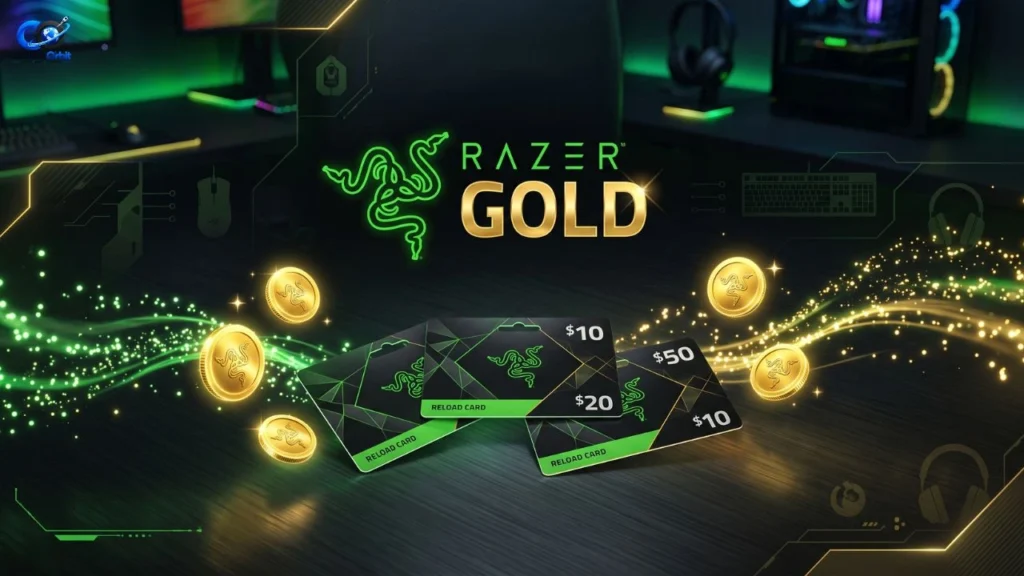
Razer Gold is a digital payment system designed mainly for gaming and entertainment. Think of it like digital money that you can load into a gaming wallet and then spend on supported digital products. Razer says Gold can be used to buy games and in-game content, while purchases can also earn Razer Silver rewards.
“If you are also interested in gaming subscriptions, you can check our guide to Xbox Game Pass Price.”
The important thing to understand is that Razer Gold is not a game itself. It is also not the same thing as buying a Razer mouse, keyboard, laptop, or other physical product. Your Gold wallet is intended for digital content and services on Razer Gold and supported partner platforms. Razer’s support information specifically says that once funds are loaded into the Gold Wallet, those funds cannot be used to purchase products on Razer.com or in RazerStores.
Razer Gold vs. Razer Silver
Razer Gold and Razer Silver are related, but they do different jobs.
| Feature | Razer Gold | Razer Silver |
| Main purpose | Digital payment | Loyalty rewards |
| Used to buy supported content | Yes | No, generally used for rewards |
| Earned from Gold purchases | You spend Gold | You can earn Silver |
| Can be redeemed for rewards | No | Yes |
| Designed for | Payments | Rewards and loyalty |
Razer Silver is the loyalty program connected to Razer’s services. Razer says users can earn Silver through Razer Gold purchases and other qualifying activities, then use it for selected rewards, events, discounts, and other offers.
For example, imagine you add $20 worth of Gold to your wallet and spend it on supported game content. The Gold pays for the purchase, while an eligible purchase may also help you earn Silver. This means the two systems can work together, but they should not be treated as the same currency.
How to Buy, Add, and Use Razer Gold
Getting started with Razer Gold is fairly simple. You first need a Razer account and then choose an available way to add funds. Depending on your country, you may be able to use payment cards, local payment methods, gift cards, or Razer Gold PINs.
Razer’s official Gold PIN page currently shows several PIN values and payment methods. It also explains that Gold PINs can be used for supported direct top-ups or redeemed through the Razer Gold system.
How to add money to your wallet
The exact payment options depend on your region, so the process may look slightly different from one country to another.
A basic process looks like this:
- Sign in to your Razer account.
- Open the Razer Gold section.
- Select a reload amount.
- Choose an available payment method.
- Complete the payment.
- Check your Gold Wallet balance.
- Use the balance on a supported game or digital service.
Razer recommends selecting the currency that matches your region of residence where possible. It also notes that currency conversion can become relevant when using a different currency.
Using a Razer Gold PIN
A Gold PIN can be useful when you do not want to use a bank card directly. Razer’s instructions say that if a game supports direct top-up, you can select Razer Gold Direct Top-up and enter the required game account or character information. You then enter the Gold PIN details and follow the instructions on screen.
Always buy PINs from trusted sources. Avoid random websites offering extremely cheap codes. A fake, already-used, or stolen code can leave you without your money and may create problems with your account.
Can you use Gold for physical Razer products?
This is a common mistake. Razer Gold Wallet funds are not the same as money you can spend on Razer hardware.
Razer’s official support page states that after a Razer Gift Card balance is transferred into the Gold Wallet, those funds cannot be used on Razer.com or RazerStores. Gold Wallet funds are intended for digital content and services on Razer Gold and its partner platforms.
So, if your goal is to buy a gaming mouse or keyboard from Razer’s hardware store, do not load your money into Gold first.
Where Can You Use Razer Gold?
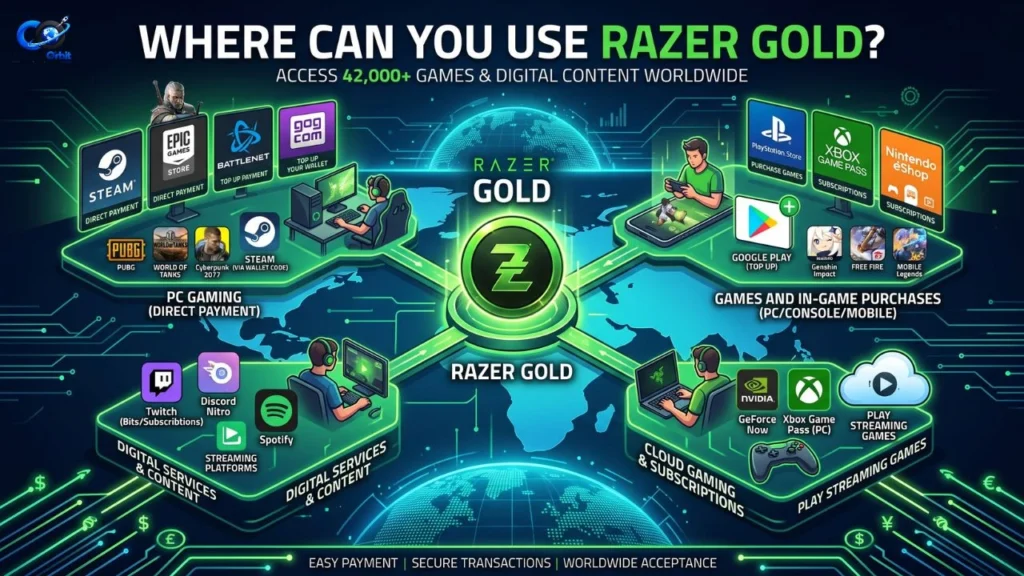
One of the biggest reasons gamers use Razer Gold is the number of supported games and entertainment services. Razer’s global services page currently describes Gold as being available across more than 42,000 games and entertainment titles.
However, the number and type of available products can vary by country. Razer’s regional catalog shows different products and categories depending on location. For example, its Pakistan catalog currently lists game and entertainment products and lets users filter by platform and genre.
Games and digital content
Razer Gold supports different types of digital purchases. The official catalog includes categories such as direct game top-ups, PINs and gift cards, and products sold through partner stores.
Depending on your region, the catalog can include products related to:
- Mobile games
- PC games
- Console services
- Game currencies
- Game cards
- Digital subscriptions
- Entertainment services
- In-game purchases
Razer’s catalog also lists examples such as Xbox-related products, EA Play, Nintendo eShop products, and other digital services in supported markets. Availability can change, so you should check the catalog for your own country before buying.
Direct top-up vs. PIN or gift card
These two options are not exactly the same.
Direct top-up usually means you provide the required game account or player information and the purchased value is added directly to that account.
A PIN or gift card gives you a code that you redeem according to the instructions for that product.
The best choice depends on the game and the country. Before paying, check the product description carefully so you know whether you are purchasing a direct top-up, a digital code, or another type of product.
Razer Gold Benefits, Drawbacks, and Safety Tips
Razer Gold can be convenient, but it is not automatically the best payment option for every gamer. Before using it regularly, you should understand both the good and bad sides.
Main benefits
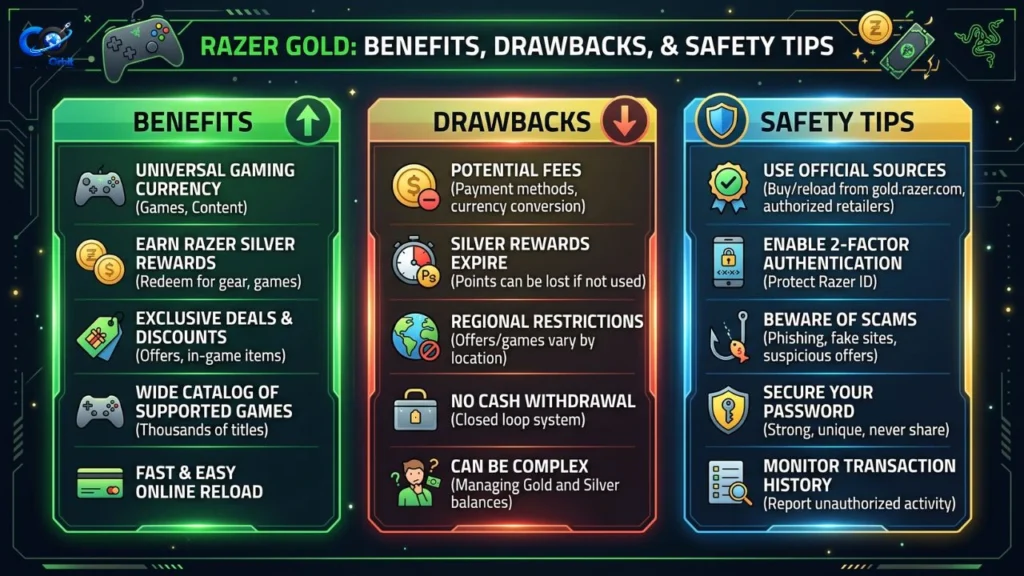
The biggest advantage is convenience. Instead of dealing with a separate payment process for every supported game, you can use a gaming-focused wallet across supported services.
This is a strong source for information about fees, wallet balances, currencies, and payment-related questions.
Other benefits can include:
- Access to many supported games and entertainment products
- Multiple payment and reload options in supported regions
- Gold PIN support
- Razer Silver rewards on eligible activities
- Special deals and promotions
- A single gaming-focused account
- Support for direct top-ups on selected games
Razer also promotes exclusive game deals and says users can earn Silver when making qualifying purchases through Gold.
Possible drawbacks
The first drawback is regional availability. A product that appears in one country’s catalog may not be available in another. Razer’s terms also include location-specific rules for many countries, including Pakistan, India, the United States, Canada, Australia, and others.
Another issue is that some payment channels may charge extra fees. Razer says certain payment channels can impose a surcharge when you reload Gold, and local consumption taxes may also apply depending on the region.
Razer also states that while the normal Gold wallet balance does not expire, Bonus Razer Gold from promotions and contests can expire within 30 days of being issued.
Common mistakes to avoid
1. Buying the wrong region
A digital product may be region-specific. Always check the country, currency, platform, and product description before paying.
2. Assuming every game accepts Gold
Razer Gold is widely supported, but not every game accepts it. Check the official catalog first.
3. Confusing Gold with Silver
Gold is used for supported purchases. Silver is a loyalty reward. They are not interchangeable.
4. Loading too much money
Do not add a large amount simply because you see a promotion. Load an amount you expect to use.
5. Ignoring extra charges
Check the final checkout amount. Payment-channel fees and local taxes can affect what you actually pay.
Expert safety advice
Treat your Gold PIN like cash. Do not post the PIN online, send it to strangers, or give it to someone who promises to “activate” it for you.
Also, use the official Razer Gold website or trusted retailers when purchasing codes. If a website offers a $50 code for an unrealistically low price, that is a warning sign.
Is Razer Gold Worth Using?
For gamers who regularly buy digital game content, Razer Gold can be a useful payment option. It brings supported purchases into one gaming-focused system and can also provide access to Razer Silver rewards and selected promotions.
It is particularly useful when your favorite game already supports Razer Gold and your preferred local payment method is available. In that situation, the service can make topping up your game account simple.
However, convenience does not mean you should always choose Gold. Compare the final price with other official payment methods. Look for additional fees, regional restrictions, exchange rates, and promotional conditions before completing a purchase.
The best approach is simple: check the exact product, region, payment fee, and final price before paying.
If you already use Razer services and regularly purchase supported game content, the Gold and Silver combination may be useful. If you only buy games once or twice a year, a normal payment method may be easier.
Frequently Asked Questions
1. What is Razer Gold?
Razer Gold is a digital payment system designed for gamers. It can be used to purchase supported games, in-game content, gift cards, and other digital entertainment.
2. Is Razer Gold real money?
Razer Gold is digital wallet credit rather than physical cash. It can be used for eligible digital purchases, but you should not think of it as a normal bank balance.
3. What is Razer Silver?
Razer Silver is Razer’s loyalty rewards program. Eligible activities and purchases can earn Silver, which can then be redeemed for selected rewards and discounts.
4. Does Razer Gold expire?
Razer says the regular Gold Wallet balance does not expire. However, Bonus Razer Gold obtained through promotions or contests can expire within 30 days from the date it is issued.
5. Can I use Razer Gold to buy a Razer mouse?
No. Razer says funds loaded into the Gold Wallet are for digital content and services on Razer Gold and partner platforms, not purchases on Razer.com or RazerStores.
6. Can I use Razer Gold for mobile games?
Yes, where the particular game and region support Razer Gold. The catalog includes mobile games and direct top-up products in supported markets.
7. Can I buy Razer Gold with a credit card?
Payment methods depend on your region. Razer’s Gold PIN checkout, for example, lists credit cards among available payment methods in supported markets.
8. Can I use Razer Gold in Pakistan?
Razer provides Pakistan-specific Razer Gold terms and a Pakistan catalog, but the exact products and payment methods available can vary. Check the Pakistan version of the official Gold site before purchasing.
9. Is Razer Gold safe?
Razer Gold is an official Razer service. However, you should still use the official website or trusted sellers, protect your account information, and avoid suspiciously cheap Gold PINs.
10. Where can I check which games support Razer Gold?
The official Razer Gold catalog is the best place to check. You can browse supported games and filter products by category, genre, and platform.
Conclusion
Razer Gold is a convenient digital payment option for gamers who regularly purchase supported games, game credits, gift cards, and other online entertainment. Its biggest strengths are convenience, broad availability, regional payment options, and the ability to earn Razer Silver through eligible activities.
Still, you should not treat every Gold offer as a good deal. Check your region, the supported game, payment fees, currency, and final price before making a purchase. Remember that Gold and Silver have different purposes, and Gold Wallet funds cannot be used to buy physical Razer products.
If the games you play support it, Razer Gold can be a practical way to manage digital gaming purchases. The safest approach is to use official Razer pages, check the product details carefully, and keep your Gold PIN and account information private.